What happens to your smart home when the Texas grid goes down
How often Texas homes lose power, what Winter Storm Uri taught us, how to size a UPS for the equipment rack with the math shown, what keeps working without internet, and the order to bring everything back.

How often Texas loses power
The U.S. Energy Information Administration (EIA) collects reliability data from utilities. Two numbers matter:
- SAIDI: average minutes without power per customer per year.
- SAIFI: average number of interruptions per customer per year.
Utilities report them two ways: with “major event days” (big storms) included, and without. The first tells you what customers actually lived through. The second shows day-to-day reliability.
SAIDI including major events, 2020–2025
Spikes are storm years: Winter Storm Uri in 2021 and Hurricane Beryl in 2024 (2.6 million Texas customers out); each year uses the most recent EIA table that reports it.
View the data
| Texas | U.S. total | |
|---|---|---|
| 2020 | 433 minutes | 492 minutes |
| 2021 | 1,175 minutes | 440 minutes |
| 2022 | 212 minutes | 336 minutes |
| 2023 | 496 minutes | 342 minutes |
| 2024 | 1,271 minutes | 611 minutes |
| 2025 | 224 minutes | 263 minutes |
| Year | Texas, all events (min) | U.S., all events (min) | Texas, without major events (min) | U.S., without major events (min) |
|---|---|---|---|---|
| 2020 | 432.7 | 491.9 | 163.7 | 119.0 |
| 2021 | 1,175.3 | 440.0 | 147.4 | 121.5 |
| 2022 | 212.0 | 335.5 | 127.5 | 125.7 |
| 2023 | 496.2 | 342.0 | 124.7 | 118.4 |
| 2024 | 1,270.6 | 611.3 | 129.4 | 126.0 |
| 2025 | 223.5 | 262.6 | 128.7 | 120.8 |
What this tells you:
- On an ordinary year, Texas is close to the national average. Without major events, Texas runs about 125 to 165 minutes a year, a little above the U.S. figure.
- The big risk is the bad year. In 2021 and 2024, a single event pushed Texas to roughly 20 hours per customer on average. Averages hide the tail: some homes were out for days while others never blinked.
- Interruptions are frequent. EIA’s 2025 figures show Texas customers averaged about 1.7 interruptions (SAIFI, counting major events), against about 1.3 for the U.S. Even a short interruption can reboot a router and interrupt a recording or a drive write.
These are statewide averages. Your utility and neighborhood matter. Much of Dallas–Fort Worth is served by Oncor’s wires, with TNMP, city-owned utilities and electric co-ops in some areas, so check who delivers power to your address. Overhead lines and big trees generally raise the odds of storm outages.
What Winter Storm Uri taught us
Uri is the event most Texas homeowners plan around. The facts from the official reviews:
- Generation collapsed. ERCOT’s February 24, 2021 presentation to its board reported 52,277 MW of generation forced out at the worst point, 48.6 percent of the 107,514 MW of installed capacity.
- Rotating outages became long outages. ERCOT’s peak load-shed order was 20,000 MW, and its 2011 vs. 2021 comparison table lists a load-shed request lasting 70.5 hours. ERCOT said local utilities were limited in their ability to rotate outages because of the size of the generation shortfall and the number of circuits serving critical loads.
- The grid came close to a full blackout. ERCOT reported that frequency fell to 59.302 Hz and stayed below 59.4 Hz for 4 minutes 23 seconds. ERCOT’s slide notes that more generators would have tripped if frequency had stayed below 59.4 Hz for 9 minutes.
- Millions of people were in the dark. The joint FERC and NERC review, announced in November 2021, found that more than 4.5 million people in Texas lost power, some for as long as four days. It found that freezing issues (44.2 percent) and fuel issues (31.4 percent) caused 75.6 percent of the unplanned generating unit outages.
- The human cost was high. The Texas Department of State Health Services counted 246 storm-related deaths in its final report. About two-thirds (161, or 65.4 percent) were from extreme cold exposure, nearly all of them hypothermia.
The lesson for a smart home is not that a UPS will carry you through four days. It will not. The lesson is to know what you need for the first hour, what you need for a day, and what you simply let go dark.
What keeps working and what does not
Think of your home in three layers.
Layer 1: things with their own batteries
- Smart locks usually run on batteries and keep working, including keypads. Keep a physical key anyway.
- Battery sensors (leak, door, motion) keep sensing, but they can only report if the hub, network and border router they talk to have power.
- Phones work until the cell network or your battery runs out.
Layer 2: things on local power and local control
If your controller, network switch, Wi-Fi and hubs are on a UPS, many systems keep running locally with no internet:
- Lutron lighting. Lutron says Caséta products do not use your Wi-Fi or the internet to communicate inside the home; they use Lutron’s Clear Connect radio, so you can operate lights from inside the home even when the internet or Wi-Fi is down. Of course, the lights themselves need house power; a UPS on the hub does not light the rooms.
- Matter devices are designed for local control through a local controller and, for Thread devices, a powered border router.
- Pro control platforms such as Control4, Crestron and Savant run their programming on a local controller. Touch panels and keypads on the network keep working if the controller and network stay up. Remote access does not.
Layer 3: things that need the internet
- Voice assistants and most cloud-based apps.
- Remote access from your phone when you are away.
- Cloud-recorded cameras and video doorbells (local recording to a network video recorder on a UPS is the exception).
- Streaming.
Your internet only works if the provider’s equipment in the neighborhood also has power. How much backup that equipment has varies by provider and location, and in a long, wide outage you should assume it may fail. A cellular backup on your router is a useful second path.
Things that surprise people
- Gas heat still needs electricity. A gas furnace’s blower, controls and igniter need power. Most tankless gas water heaters do too.
- Garage doors need a manual release unless the opener has a battery backup.
- Pool equipment and well pumps stop.
- Motorized shades stop where they are unless they run on batteries.
Size the UPS for the equipment rack
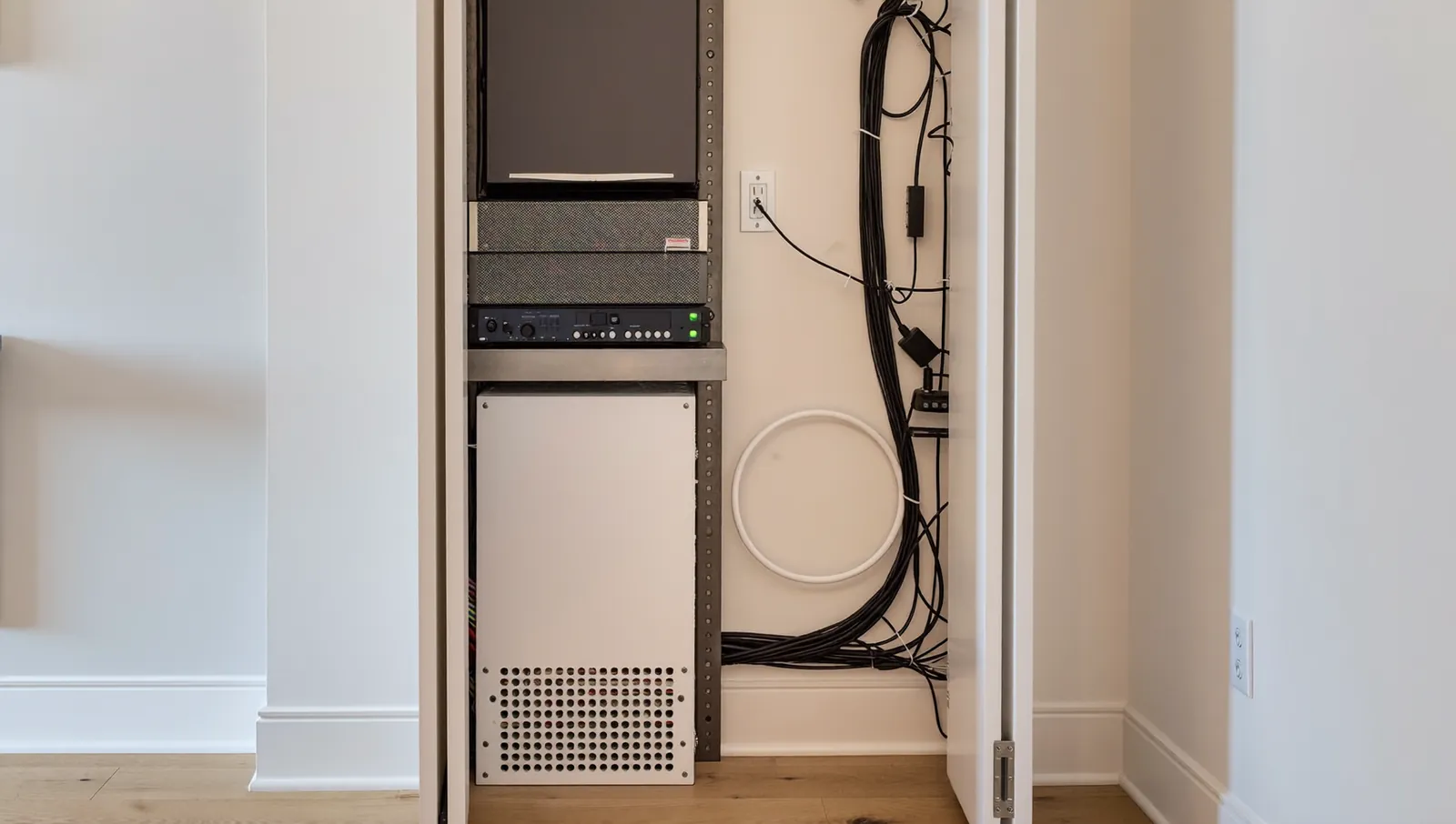
A UPS (uninterruptible power supply) bridges short outages, rides through blips and gives equipment time to shut down cleanly. For a smart home, its job is to keep the network and control system alive for the outages that happen most: minutes to an hour or two.
What to put on it
Put these on the UPS:
- Internet modem or fiber terminal
- Router or firewall
- Network switch (especially a PoE switch that powers access points and cameras)
- Wi-Fi access points (usually powered by the PoE switch)
- Home automation controller and lighting hubs
- Thread border routers and smart home hubs
- Network video recorder, if you record cameras locally
Leave off the big loads: AV receivers, amplifiers, TVs, projectors and subwoofers. They will drain the battery in minutes and you will not be watching movies during an outage.
VA vs watts
UPS units list two ratings. Watts are the real power your equipment draws. VA (volt-amperes) is apparent power, voltage times current. The ratio between them is the power factor. Schneider Electric’s APC White Paper 15 (“Watts and Volt-Amps: Powerful Confusion”) says that for small UPS units designed for computer loads, it has been reasonable to assume the watt rating is about 60 percent of the published VA rating, and that larger UPS systems increasingly carry equal watt and VA ratings.
The rule: size by watts, and read the watt rating on the spec sheet, not the VA number on the box.
Step 1: measure the load
The best way is to measure. Many UPS units show the load in watts on the display. A plug-in power meter works too. Nameplate ratings on power adapters show the maximum the adapter can supply, not what the device draws, so adding them up overestimates.
Measure with everything running normally, including PoE devices and cameras at night (infrared lights add load).
Step 2: leave headroom
A common rule of thumb is to keep the steady load under about 80 percent of the UPS watt rating. That leaves room for startup surges and future devices, and battery runtime is much better at lighter loads.
Step 3: estimate runtime
Here is the math. Every input below is an assumption chosen for illustration, not a measured or published figure, so swap in your own:
- Battery energy (Wh) = battery voltage x amp-hour rating. Example: two 12 V, 9 Ah batteries in series make a 24 V, 9 Ah pack: 24 x 9 = 216 Wh. Look up the actual battery voltage and amp-hours for your model; they vary widely.
- Inverter efficiency: assumed 85 percent.
- Usable fraction: assumed 80 percent, to allow for aging and not draining to zero.
- Usable energy = 216 x 0.85 x 0.80 = about 147 Wh.
- Runtime (minutes) = usable Wh / load W x 60.
At a 200 W load: 147 / 200 x 60 = about 44 minutes. With a larger 1,000 Wh battery (for example an external battery pack or a lithium UPS), usable energy is 1,000 x 0.85 x 0.80 = 680 Wh, and 200 W runs about 204 minutes.
Illustration with assumed inputs: two battery sizes, 85% inverter efficiency, 80% usable capacity
Find your measured load on the bottom axis; these are simple estimates from assumed inputs, real lead-acid runtimes fall short at heavy loads, so check the manufacturer's runtime chart.
View the data
| 216 Wh battery | 1,000 Wh battery | |
|---|---|---|
| 100 W | 88 minutes | 408 minutes |
| 200 W | 44 minutes | 204 minutes |
| 300 W | 29 minutes | 136 minutes |
| 400 W | 22 minutes | 102 minutes |
| 500 W | 18 minutes | 82 minutes |
| 600 W | 15 minutes | 68 minutes |
Two cautions on this math:
- Batteries are not linear. Lead-acid batteries deliver less of their rated energy at high discharge rates, so runtime at heavy loads is shorter than the simple formula. Manufacturers publish runtime charts by load; use those for the final choice.
- Batteries age. Lead-acid UPS batteries lose capacity over time, and heat speeds that up, so a hot Texas closet works against you. Check the manufacturer’s stated battery life and operating temperature range, and compare lithium iron phosphate models if you want a longer-lived battery.
Line-interactive or online?
- Line-interactive UPS units are common for home racks. They pass utility power through, correct small voltage swings and switch to battery when power fails. APC, for example, lists a transfer time of 2 to 4 milliseconds for its line-interactive Smart-UPS models at the default high-sensitivity setting.
- Online (double-conversion) units run equipment from the inverter all the time, so APC lists no transfer time for its double-conversion models. They typically cost more and give off more heat.
If you have or plan a whole-home generator, ask about online UPS units for the rack. CyberPower notes that a line-interactive UPS switches to battery when input frequency drifts outside its window, which can happen on generator power, while double-conversion units are designed to accept those frequency variations.
Turn on shutdown and alerts
Connect the UPS to the network so it can alert you when it switches to battery and shut storage down cleanly. Test it once a year by unplugging it from the wall.
Generator and transfer switch considerations
A UPS covers minutes to hours. For days, you need a generator or a home battery system.
This section is general information, not legal or code advice; your electrician and local permit office have the final word.
- Licensing. Connecting a generator or battery system to house wiring is electrical work. TDLR says anyone who performs non-exempt electrical work in Texas must be licensed and work through a licensed electrical contractor, and your city may require a permit. Gas piping is regulated too: the Texas Plumbing License Law defines plumbing to include piping that supplies or distributes gas, which the Texas State Board of Plumbing Examiners licenses, and propane (LP-gas) installation work is licensed separately by the Railroad Commission of Texas. Use licensed pros for both.
- Never backfeed. Connecting a generator directly to house wiring, for example through a wall or dryer outlet with a “double male” cord, can send power back onto the utility lines. Austin Energy warns that this backfeed can kill line workers making outage repairs and says the only safe way to connect a portable generator to existing wiring is a transfer switch. Ask your electrician which connection methods your local code allows.
- Transfer switch types. A standby generator usually has an automatic transfer switch that starts the generator and moves the load once it is running. A portable generator typically uses a manual transfer switch with a generator inlet.
- Whole-home or selected circuits. A smaller generator can carry a subpanel with the essentials: furnace blower, refrigerator, a few lights, the network rack, the well pump. Whole-home units carry everything, including air conditioning if sized for it.
- Carbon monoxide. Run portable generators outdoors, far from doors, windows and vents. Never in a garage, even with the door open.
- The UPS still matters. An automatic standby generator needs time to start and transfer the load. The UPS covers that gap so the network never drops.
Restart order after power returns
When power comes back, everything boots at once. Devices that start before the network is ready can come up without an address or lose their connection to the controller. Bring things up in order.
- Wait a few minutes after power returns. Restoration can flicker. Leave big loads off until it is stable.
- Internet modem or fiber terminal. Wait until it shows online.
- Router or firewall. Wait until it hands out addresses.
- Core network switches, then PoE switches. Access points and PoE cameras come up with them.
- Home automation controller, lighting hubs and Thread border routers.
- Storage and video recorders. Let them check their drives.
- AV equipment last: receivers, amplifiers, TVs, projectors.
- Test. A lighting scene, a keypad, the app from outside the home (cell data), a camera, the thermostat.
A smart power distribution unit with sequenced outlets can automate this.
Also check for surge damage. Power restoration and lightning are common causes of failed equipment. A whole-home surge protective device at the panel, installed by a licensed electrician, plus point-of-use surge protection at the rack, gives two layers of defense.
Before the next storm: a checklist
- [ ] UPS on the modem, router, switches, controller, hubs and border routers, sized by watts with headroom.
- [ ] UPS batteries tested and replaced on schedule; a note of the install date on the unit.
- [ ] UPS alerts and safe shutdown configured.
- [ ] Physical keys for smart locks, and manual release known for the garage door.
- [ ] Cellular backup on the router if remote access matters to you.
- [ ] Generator (if any) exercised, with a transfer switch installed by a licensed electrician.
- [ ] Restart order written down and taped inside the equipment closet.
- [ ] Contact info for your utility’s outage reporting and your integrator.
What to do next
- Measure the load on your equipment rack this week.
- Decide how long you want the network and controls to last: 30 minutes for blips, or several hours for long storms.
- Size the UPS (or upgrade the battery) using the runtime math above and the manufacturer’s runtime chart.
- If you want days of backup, talk to a licensed electrician about a generator or battery system with a proper transfer switch.
If you are in Dallas–Fort Worth, we are happy to look at your equipment rack and outage plan with you.
Frequently asked questions
How long will a UPS keep my smart home running?
It depends on the load and the battery. Using the assumptions in this guide (85 percent inverter efficiency, 80 percent usable capacity), a 216 Wh battery runs a 200 W network and controller load for roughly 40 to 45 minutes, and a 1,000 Wh battery runs it for about three hours. These are estimates; measure your load and check the manufacturer’s runtime chart.
Will my smart lights work during a power outage?
The light fixtures need house power, so they go dark unless you have a generator or home battery. What a UPS keeps alive is the control system, so when power returns, or on generator circuits, keypads and scenes work right away.
Can I plug a portable generator into my house?
Not through a wall outlet. You need a transfer switch with a generator inlet (or another connection method your local code allows), installed by a TDLR-licensed electrician. Austin Energy warns that backfeeding through house wiring can kill line workers making repairs.
How often does Texas lose power compared with the rest of the country?
In ordinary years, about the same: Texas averaged about 129 minutes without power in 2024 and 2025 excluding major events, close to the U.S. average. In storm years the gap widens; in 2024 Texas averaged 1,270.6 minutes counting major events, about twice the U.S. average.
Sources
- Table 11.3, Reliability Metrics Using Any Method of U.S. Distribution System by State, 2025 and 2024, U.S. Energy Information Administration, Electric Power Annual
- Table 11.3, Reliability Metrics by State, 2023 and 2022, U.S. Energy Information Administration, Electric Power Annual archive
- Table 11.3, Reliability Metrics by State, 2021 and 2020, U.S. Energy Information Administration, Electric Power Annual archive
- Hurricanes in 2024 led to the most hours without power in the United States in 10 years, U.S. Energy Information Administration, Today in Energy, December 2025
- Review of February 2021 Extreme Cold Weather Event, ERCOT Board presentation, February 24, 2021
- The February 2021 Cold Weather Outages in Texas and the South Central United States, FERC, NERC and Regional Entity Staff Report, November 2021
- Final Report on February 2021 Freeze Underscores Winterization Recommendations (FERC news release), T&D World, November 2021
- February 2021 Winter Storm-Related Deaths, Texas, Texas Department of State Health Services, December 2021
- Watts and Volt-Amps: Powerful Confusion, White Paper 15, Schneider Electric (APC)
- What is the transfer time of APC Smart-UPS and Symmetra units?, Schneider Electric FAQ
- How a UPS System Works with a Backup Generator, CyberPower Systems
- Portable Generator Safety, Austin Energy
- Electricians, Texas Department of Licensing and Regulation
- Texas Occupations Code Chapter 1301, Plumbers (Section 1301.002 definitions), Texas Legislature
- Texas State Board of Plumbing Examiners
- LP-Gas License Categories, Railroad Commission of Texas
- Caséta FAQs: Did you know, Lutron Support
More from the Journal

Tunable white and circadian lighting: what the research actually shows
Light at the eye affects your body clock, and the science now gives real numbers. Here is what is proven, what is not, and how a lighting control system puts the numbers to work at home.
Control4 vs Savant vs Crestron: which smart home system fits your home?
How the three big professional platforms compare on interfaces, dealers, programming, yearly fees and long-term support, plus where Josh.ai, Lutron-only systems and DIY options like Home Assistant and Apple Home fit.

Is home automation worth it, and does it add resale value?
What buyer surveys, listing studies and federal energy data actually show about smart home value, where the evidence is strong, where it is thin, and how to spend so the money holds up.
Planning a project in Dallas–Fort Worth?
Tell us about the house. You get a clear scope and a price range back.