How much does a smart home system cost?
A plain breakdown of what whole-home control, lighting, shades, audio, theater and networking cost in 2026, what pushes the number up or down, and the yearly fees most quotes leave out.
The short answer: national cost ranges for 2026
There is no single price for a “smart home.” The term covers everything from a few app-controlled plugs to a fully programmed house where one button sets lights, shades, music and temperature at once. What you pay depends on how many rooms you automate, which systems you include, and whether a professional designs and programs it.
National cost guides give a useful starting point. HomeGuide’s smart home cost guide (titled 2026, last revised September 2025) puts a basic system (connected features in a few rooms) at $2,000 to $5,000, a mid-level system (whole-home lighting, multi-room audio and similar upgrades across multiple rooms) at $5,000 to $15,000, and a luxury or full system at $15,000 to $100,000 and up. It also gives brand ranges for professionally installed platforms: Control4 systems from about $5,000 to $50,000 and up, and Crestron systems from about $20,000 to $100,000 and up.
National installed ranges, HomeGuide guide titled 2026
Each bar runs from the low to the high end of the published national range; the luxury and brand ranges are open-ended at the top.
Source: HomeGuide, How Much Does a Smart Home Cost? (2026), revised September 30, 2025
View the data
| Low | High | |
|---|---|---|
| Basic smart home | $2,000 | $5,000 |
| Mid-level smart home | $5,000 | $15,000 |
| Luxury or full system | $15,000 | $100,000 |
| Control4 system | $5,000 | $50,000 |
| Crestron system | $20,000 | $100,000 |
Two cautions about these numbers. First, they are national averages, not Dallas–Fort Worth quotes. Second, the brand ranges are wide because a Control4 or Crestron “system” can mean one media room or a 10,000 square foot estate. The useful question is not “what does Control4 cost” but “what does it cost to do these specific rooms and functions.”
What each system costs
A whole-home system is a bundle of separate subsystems tied together by a controller and an app. Pricing each piece separately is the best way to see where your money goes.
Control and automation (the “brain”)
This is the processor, the software license, the touchscreens or remotes, and the programming time that makes everything work together. Platforms such as Control4, Savant and Crestron are sold and programmed through authorized dealers, so this line includes labor. The HomeGuide brand ranges above mostly reflect this layer plus whatever subsystems are bundled in.
If you only want a few smart devices and are comfortable setting them up yourself, the platform can cost little: Apple Home charges no subscription, though Apple says you need a home hub (HomePod, HomePod mini, HomeView or Apple TV) for remote control and automations.
Lighting control
Lighting control replaces standard switches with smart dimmers and keypads so you can set scenes (“Dinner,” “Goodnight”) instead of flipping ten switches. Costs depend mainly on the number of loads (circuits of lights) and keypads, and on whether you choose a wireless retrofit system or a wired, panelized system.
A few facts help scope it:
- Lutron’s Caséta bridge supports up to 75 devices, which suits a smaller home or a few rooms.
- Lutron’s RadioRA 3 is a professionally installed system that “scales up to 400 devices with paired processors,” according to Lutron’s product page. Lutron’s technical overview breaks that down as up to 200 Clear Connect Type X and 190 Type A devices across four processors.
- Replacing a switch or dimmer is line-voltage electrical work. In Texas, the Texas Department of Licensing and Regulation (TDLR) says anyone who performs non-exempt electrical work must be licensed. Budget for a licensed electrician, either on the integrator’s team or subcontracted.
Motorized shades
Shades add up fast because you pay per window. HomeGuide’s window shade cost guide lists motorized shades at about $350 to $1,000 per window on average with installation, and its smart home guide puts automated blinds at $300 to $1,000 per window installed. Size, fabric, and power method (hardwired, plug-in or battery) drive the spread.
In Texas, west- and south-facing glass takes a lot of afternoon sun. Shades on those windows can be scheduled to lower before the heat of the day. That is a comfort benefit first; the energy effect depends on your glass, orientation and cooling system, and we have not seen a reliable national figure we would quote.
Whole-home audio
We did not find a national cost guide with consistent, current per-room figures for whole-home audio, so we will not quote one. The national guides we checked either disagreed with themselves or folded audio into broader smart home tiers (HomeGuide counts multi-room audio as part of its $5,000 to $15,000 mid-level tier). What moves the price is easy to list, though:
- Number of zones. Each room or area that plays its own music needs its own amplifier channel and speakers.
- Architectural vs wireless speakers. In-ceiling and in-wall speakers cost more to install than wireless speakers, but they disappear into the room and do not need outlets on a shelf.
- Construction stage. Speaker wire pulled before drywall is far cheaper than fishing it into finished walls.
- Outdoor zones. Patio and pool speakers need weather-rated hardware and longer wire runs.
Ask each bidder to price the same zone list so you can compare per-zone cost.
Home theater and media rooms
Theater costs depend on whether you are upgrading a living room or building a dedicated room. HomeGuide’s home theater cost guide (titled 2026, last revised December 2024) puts a basic setup (TV, sound bar, sofa seating) at $2,000 to $5,000, an average theater (projector or larger TV, surround sound, moderate acoustic treatment, professional wiring) at $10,000 to $20,000, and a high-end theater at $25,000 to $42,000 and up. Acoustic treatment, seating, a projector and screen, and Dolby Atmos speaker layouts are the big variables.
National installed ranges, HomeGuide guide titled 2026
Each bar shows the published low and high national cost; the high-end range is open-ended at the top, and local labor and equipment choices move you within or beyond these ranges.
Source: HomeGuide, How Much Does a Home Theater Cost? (2026), revised December 4, 2024
View the data
| Low | High | |
|---|---|---|
| Basic home theater | $2,000 | $5,000 |
| Average home theater | $10,000 | $20,000 |
| High-end home theater | $25,000 | $42,000 |
Networking and Wi-Fi
Every smart system depends on the network. A weak network is the most common reason a smart home feels unreliable. Fixr lists a basic wireless network installation at $300 to $500 nationally (January 2025), which covers a simple router setup, not a whole-home system with several wired access points. Cable runs are often priced by length; Fixr lists $1 to $2.50 per linear foot.
For a larger home, plan on wired access points (each one fed by its own Ethernet cable) rather than relying only on wireless mesh. Wi-Fi 7 equipment has been certified by the Wi-Fi Alliance since January 2024, so it is a reasonable choice for new installs in 2026, though most smart home devices themselves still use older Wi-Fi versions, Thread or Zigbee.
What drives the cost up or down
Most quotes move on the same handful of variables:
- How many rooms and functions. Automating the main living areas and primary suite costs far less than every room.
- Wired vs wireless. Wired keypads and centralized lighting panels are robust but need cable runs. Wireless products cost less to install in finished homes.
- Shade count and size. Twenty large windows can cost more than the whole control system.
- Platform and licensing. Professional platforms add dealer programming and, in some cases, yearly fees.
- Programming time. Custom scenes, schedules and integrations take hours. Ask how many are included.
- Equipment location. Racks of amplifiers and network gear need ventilation. In DFW, a hot attic or unconditioned garage is a poor spot for electronics; plan a conditioned closet.
- Electrical work. Line-voltage work (dimmers, shade power, new circuits) must be done by a TDLR-licensed electrician.
- Labor rates. Published national hourly rates for AV and automation labor vary widely between cost guides, so ask each bidder for their hourly rate in writing and how many hours the quote assumes.
Retrofit vs new construction
New construction is the cheapest time to automate, for one reason: walls are open. Low-voltage cable for keypads, speakers, shades, access points and cameras can be pulled in a day or two before insulation and drywall. After drywall, the same cable means cutting, fishing and patching.
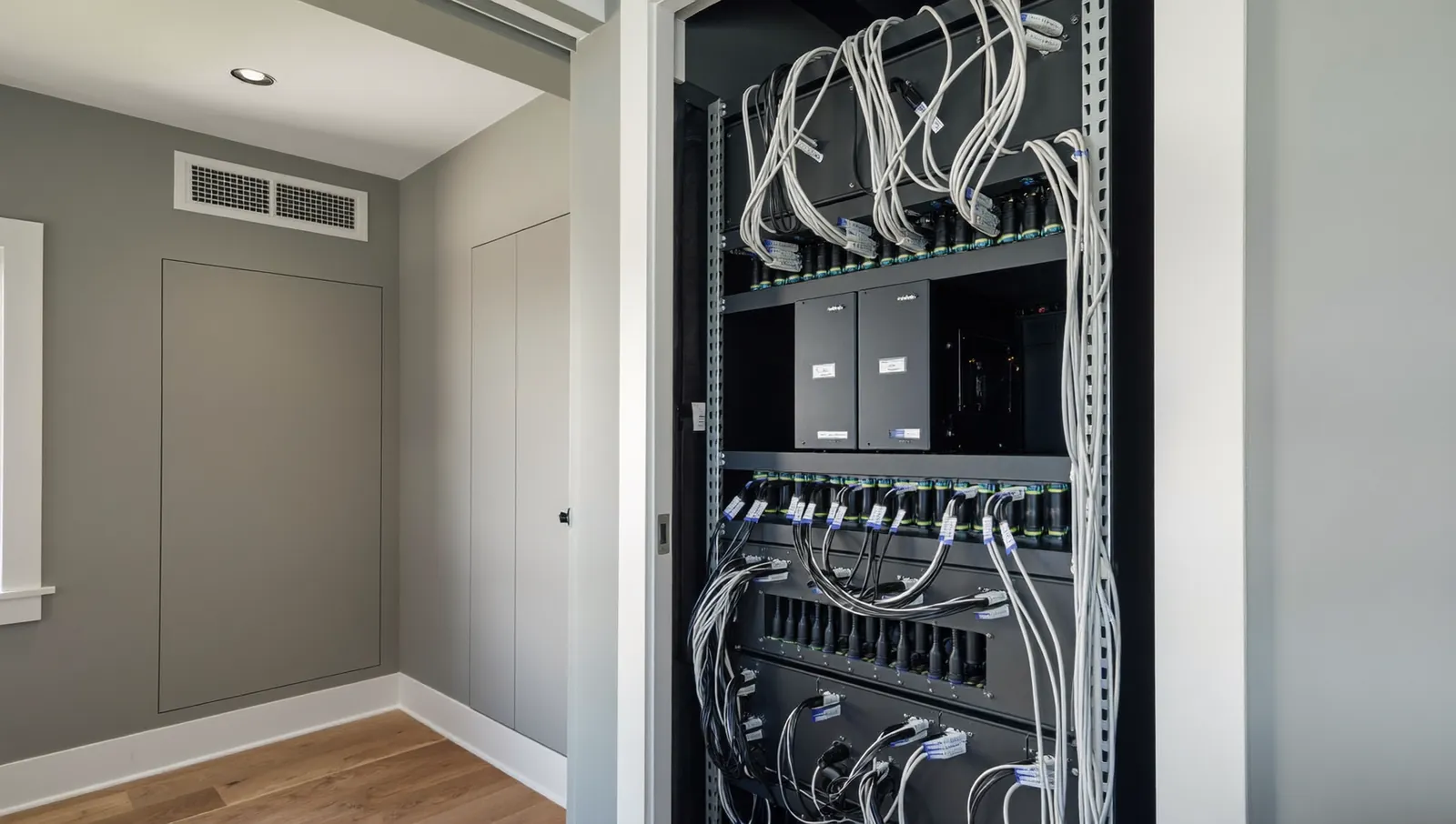
If you are building in one of the fast-growing DFW suburbs, the key date is the pre-drywall walkthrough. Have your integrator’s wiring plan approved, and the prewire done, before insulation goes in. Even if you do not buy every system now, a few extra cables are inexpensive insurance:
- Shade power or low-voltage wire to every window you might motorize.
- Speaker wire to rooms you might add to audio later.
- Ethernet to ceiling access point locations, every TV location and the office.
- A conduit from the equipment closet to the attic and to each TV wall.
For an existing home, wireless systems keep costs and disruption down. Lutron describes RadioRA 3 as retrofittable, battery-powered shades avoid new wiring, and wireless speakers can cover secondary rooms. Expect more labor per device than in new construction, and expect some trade-offs in where things can go.
How to phase a smart home budget
Phasing lets you spread costs over a few years without paying twice. The rule: install what is hard to add later first, and devices that are easy to add later second.
Here is a worked example using the national ranges cited above, for a home that wants a control system, 10 motorized shades and a media room, with whole-home audio added later:
- Phase 1, control and lighting core: HomeGuide’s mid-level range, $5,000 to $15,000.
- Phase 2, 10 motorized shades: 10 windows × $350 to $1,000 = $3,500 to $10,000.
- Phase 3, media room: HomeGuide’s average home theater range, $10,000 to $20,000.
- Total across the three phases: $18,500 to $45,000.
- Phase 4, whole-home audio: price it from quotes for your zone list, since we could not find a reliable national range. Make sure the speaker wire is in the walls during Phase 1.
Built from national cost ranges; not a quote
Each phase uses the low and high national figures cited in this guide; the last bar is the sum, and audio is left out because no consistent national range was available.
View the data
| Low | High | |
|---|---|---|
| Phase 1: control and lighting core | $5,000 | $15,000 |
| Phase 2: 10 motorized shades | $3,500 | $10,000 |
| Phase 3: media room | $10,000 | $20,000 |
| Phases 1 to 3 combined | $18,500 | $45,000 |
Practical phasing rules:
- Wire for the end state on day one. Cable is cheap; opening walls later is not.
- Build the network first. Everything else depends on it.
- Pick one control platform early. Switching platforms mid-project usually means replacing keypads and reprogramming.
- Leave space in the rack for amplifiers and future gear.
- Do shades by room or by side of the house. Start with the windows that get hard afternoon sun or need privacy.
Ongoing costs: subscriptions, licenses and service plans
The installed price is not the full cost. Several platforms charge yearly fees for remote access, voice control or updates, and most dealers offer optional service plans.
| Platform | Published yearly fee (as of November 2026) | What the fee covers |
|---|---|---|
| Control4 Connect | $249 per year (price announced by ADI, Snap One in 2025); optional for new X4 systems since November 12, 2025 | Remote access, curated Routines, Apple HomeKit integration, new features. Local app access works without it. |
| Control4 4Sight (older systems) | $120 per year (price set February 2022) | Remote access, voice control, notifications, When>>Then customization |
| Savant subscriptions | Not published; sold through integrators | Savant says features such as backup and restore, intercom and Secure Voice require an Essentials subscription |
| Crestron Home | No homeowner subscription price published by Crestron that we could find | Ask your dealer what, if anything, recurs |
| Josh.ai | Josh One from $10 per month, voice an extra $10; Josh Micro from $30 per month (October 2023 MSRP, the latest Josh has published) | Voice and AI control layer |
| Home Assistant Cloud (being renamed Home Assistant Link) | $65 per year or $6.50 per month | Remote access, offsite backups, Alexa and Google voice |
| Apple Home | No subscription | Requires a home hub for remote access and automations |
A few points that change the long-run math:
- Control4 CA-1 and Core Lite systems on the $0 or $99 Connect plan have been extended at $0 through the end of 2026, according to ADI | Snap One. CE Pro’s July 2026 coverage still describes Connect as optional. Ask your dealer what renewal looks like for 2027.
- Savant’s terms (updated October 2026) say that when a subscription ends, subscription-only features stop, and cloud content may be deleted. Where Savant allows it, up to five prepaid one-year subscriptions can be stacked, and Savant may let unused prepaid time stay with the system if you sell the house.
- Platform lifecycles matter. When Control4 previewed X4 in 2024, Snap One said it would sunset cloud services for Control4 OS 2 systems in 2026. Older systems eventually need upgrades.
- Dealer service plans (remote monitoring, priority visits, yearly checkups) are priced by each dealer. Ask for the price in writing and what is included.
Questions to ask before you sign
- Which rooms and functions does this price include, and which are allowances?
- How many hours of programming are included, and what is the hourly rate after that?
- What yearly fees will I pay to the manufacturer, and what stops working if I do not renew?
- Who does the line-voltage electrical work, and do they hold a TDLR license?
- Where will the equipment rack go, and how is it cooled?
- Is the network design (access points, switch, firewall) part of this quote?
- What happens if your company closes? Can another dealer take over my system and my programming file?
- What is the warranty on parts and on labor, in writing?
Mistakes to avoid
- Skipping the network. A cheap router under a big system causes most “the app is slow” complaints.
- Prewiring too little. Missing a shade or speaker wire before drywall is the most expensive regret in new construction.
- Buying devices before choosing a platform. Some devices integrate well with one system and poorly with another.
- Ignoring fees. Compare five-year cost, not just installed price.
- Putting electronics in the attic. Texas attics get extremely hot in summer; keep gear in conditioned space.
What to do next
Start with a list, not a brand. Write down the rooms you care about and what you want each to do (lights, shades, music, TV, climate). Mark what is a must-have now and what can wait. If you are building, get a wiring plan done before the pre-drywall walkthrough. Then ask two or three integrators to price the same list so the quotes are comparable, and ask each one for the yearly fees in writing.
If you are in Dallas–Fort Worth, we are happy to look at your plans and price your list.
Frequently asked questions
How much does a basic smart home cost?
HomeGuide’s national figures (guide titled 2026) put a basic smart home (connected features in a few rooms) at about $2,000 to $5,000. A do-it-yourself setup with a few smart switches, a thermostat and a voice assistant can cost less. Professionally designed whole-home systems start higher.
Is a smart home cheaper to do during construction?
Usually, yes. Running low-voltage cable before drywall takes far less labor than fishing cable through finished walls. Even if you delay buying equipment, prewiring for shades, speakers and access points keeps your options open at low cost.
Do smart home systems have monthly fees?
Some do. Control4 Connect is $249 a year and has been optional for new X4 systems since November 12, 2025. Josh.ai’s last published plans (2023) start at $10 a month, Home Assistant Cloud is $65 a year, and Apple Home has no subscription. Savant sells subscriptions through integrators without published prices.
How much do motorized shades cost per window?
HomeGuide lists about $350 to $1,000 per window installed, nationally. Large windows, specialty fabrics and hardwired motors push costs toward the top of that range, and battery motors can reduce wiring costs in existing homes.
Can I add to a smart home system later?
Yes, if the wiring, network and control platform are in place. Adding a shade or audio room to a system that was planned for it is mostly a hardware and programming job. Adding it to a system that was not planned for it can mean new wiring and a different platform.
Does a licensed electrician need to install smart switches in Texas?
Replacing switches and dimmers is line-voltage electrical work. TDLR says anyone who performs non-exempt electrical work in Texas must be licensed. This guide is not legal advice; check TDLR’s rules for your situation.
Sources
- How Much Does a Smart Home Cost? (2026), HomeGuide, revised September 2025
- How Much Does a Home Theater Cost? (2026), HomeGuide, revised December 2024
- How Much Do Window Shades Cost? (2026), HomeGuide
- Cost to Install a Wireless Computer Network, Fixr, updated January 2025
- Connect Is Now Optional for New X4 Systems, ADI | Snap One, 2025
- ADI Expands Control4 X4 and Control4 Connect Availability Worldwide, CE Pro, July 2026
- Enhance Your Control4 Home with 4Sight, Control4, 2022
- Snap One Announces Control4 X4 Interface at CEDIA Expo 2024, CE Pro, 2024
- Savant Subscription Terms, Savant, updated October 2026
- Savant Expands Value of the Subscription Model for Smart Home Ecosystem, Savant, 2022
- Josh.ai Debuts Scalable Software Plans for Every Project, Josh.ai, 2023
- Home Assistant Cloud pricing, Nabu Casa, 2026
- Set up your HomePod, HomePod mini, Apple HomeView, or Apple TV as a home hub, Apple Support, 2026
- RadioRA 3, Lutron Electronics, 2026
- Caséta Smart Bridge product selection FAQ, Lutron Electronics
- RadioRA 3 System Overview, Lutron Support
- Electricians, Texas Department of Licensing and Regulation
- Wi-Fi Alliance introduces Wi-Fi CERTIFIED 7, Wi-Fi Alliance, 2024
More from the Journal
Tunable white and circadian lighting: what the research actually shows
Light at the eye affects your body clock, and the science now gives real numbers. Here is what is proven, what is not, and how a lighting control system puts the numbers to work at home.
Control4 vs Savant vs Crestron: which smart home system fits your home?
How the three big professional platforms compare on interfaces, dealers, programming, yearly fees and long-term support, plus where Josh.ai, Lutron-only systems and DIY options like Home Assistant and Apple Home fit.
Is home automation worth it, and does it add resale value?
What buyer surveys, listing studies and federal energy data actually show about smart home value, where the evidence is strong, where it is thin, and how to spend so the money holds up.
Planning a project in Dallas–Fort Worth?
Tell us about the house. You get a clear scope and a price range back.